Tech review: Some robots just want to clean your floors
Published in Business News
I can remember testing my first robot vacuum. It was amazing to watch, and I really thought we were living in the future.
I soon learned it didn’t have much in the way of onboard intelligence and it just ping ponged around the room until it decided it must have covered everything or it needed a battery recharge.
My, how times have changed.
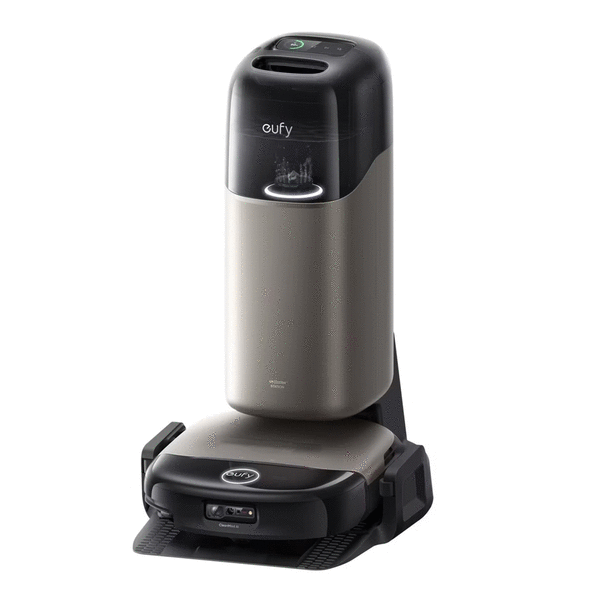
I’ve been testing the new Eufy Robot Vacuum Omni S2 ($1,599.99, eufy.com), and I can’t believe how technology has advanced.
I’ve been doing the testing, but after the initial setup, my 87-year-old mother-in-law has been reaping the benefits, as it's up and running at her house. My wife’s mom still lives at home, and we don’t want her pushing her heavy vacuum around, so a robot vacuum is a godsend.
Features
The Omni S2 is a great floor cleaning system that mops and vacuums, effortlessly switching cleaning methods depending on the floor surface.
The S2 features 30,000 Pa AeroTurbo 2 suction with 100 air-watts of cleaning power for great suction on hard floors and carpets. It is fun to watch it transition from tile to carpet — the wheels will raise up the entire robot depending on how tall the carpet is.
The run cleaning brush is actually two tangle-free brushes with a slight gap in the middle that lets dirt and hair spin toward the middle and into the dust collection cup.
The mopping system features a full-width roller mop with HydroJet self-cleaning that cleans the mop head as it’s cleaning. The base station electrolyzes the water for more hygenic mopping.
The rolling mop and the rotating side brushes actually can extend out from the body to get up close to walls and into corners.
When the vacuum is full, or the battery gets low, it’ll return to the base to empty the dirt and dirty mop water and do a deep clean on the mop head while the battery recharges. If it hasn’t finished it’s cleaning task, it’ll take off again once it’s charged up. When the robot is on the base, the roller is being cleaned with 140 degree water and dried with hot air. Dirty water is offloaded and clean water is refilled. It’s like a NASCAR pit stop.
Eufy has also built in a fragrance dispenser that freshens the air as it works. It ships with three fragrance pods. You can buy more, along with the cleaning solution that comes in a specially shaped bottle that snaps into place.
Setup
This is a substantial system to set up, but it only took about 15 minutes to get it ready to charge.
The base is packed with foam padding that holds the smaller parts in place and the robot is inside its own box.
Once you read the instructions and lay everything out, it all makes perfect sense and assembly is a snap. The base is taller than any I’ve tested, but it needs to fit the dust collection bag as well as clean and dirty water tanks and a status screen so you can see what’s going on.
The dust collection bag comes pre-installed and a bottle of the mopping solution is included, but don’t pour it in; the bottle dispenses from its spot inside the base.
The base platform that the vacuum sits on to charge has a small ramp that guides the wheels into place, and there are molded spots for the wheels to roll into to make sure everything is in place.
You place the robot on the base to charge up before the first use.
The app and mapping
You have to download the app and use it to connect the S2 to your home’s Wi-Fi network. The setup was easy to follow and worked as it should.
Once the S2 is online, you are walked through some settings to tell it about your house and how you want to clean it.
The S2 needs to get the lay of the land before it can begin cleaning, so you’ll start by creating a map. To do this, you’ll press a button on the app and the robot will take off on a mapping run that just moves from room to room, making a map of rooms and even your furniture. This is the time to open all the doors of the rooms you want it to clean.
When it finishes, you’ll see the map and the rooms it has discovered. You can name the rooms, which is handy if you want to set up specific room cleaning tasks later.
You can edit the map to set up no go zones to keep the robot from places you’d like it to avoid.
The map is constantly being updated as the robot makes each cleaning run. If you leave a door open to a new room, the robot will take notice and add it to the map.
Cleaning
I just had it map the whole house and then begin cleaning. You can schedule tasks, like whole house cleaning or you can break it up into smaller tasks with specific rooms or groups of rooms.
Depending on the size of your home and the amount of mopping, you can let the robot run unattended for a few days until the clean and dirty water tanks need filling and emptying.
The S2 is smart enough to raise up the mop to avoid getting your rugs wet.
If you’re not using the mop, you can just let the robot vacuum for weeks before you need to check on how full the bag is getting. The app will let you know if there is anything that needs your immediate attention.
I need to specifically mention the robot’s intelligence — it can see if area rugs in your home have tassels on the ends. Tassels are a weak spot for vacuums, as they tend to get caught in the rollers and bring cleaning to a halt. It is smart enough to start cleaning tasseled rugs from the middle and avoid rolling over the tassels entirely.
I can’t believe how easy it is to keep your home clean with the Omni S2. Vacuuming and mopping is great when a robot is doing the work.
My mother-in-law has named the robot “Izzy,” because when she wakes up and sees it is out cleaning, she says to herself, “Where Izzy?”
She loves Izzy and mentions him every time I talk to her. She’s thrilled with how clean he’s keeping her floors.
©2026 Tribune Content Agency, LLC.










Comments