Jim Rossman: Picking the right USB hub
Published in Science & Technology News
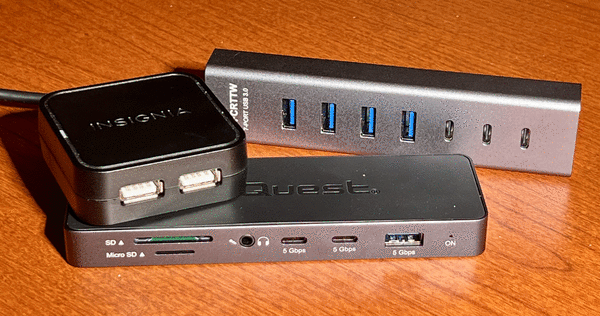
Last week a friend asked me for a recommendation for adding more USB ports to her laptop.
USB ports are added to a computer by adding a USB hub. Think of a USB hub like a plug strip that you’d use at home if you needed to plug in more devices at an electrical outlet.
There are a few factors involved in picking out the right hub.
Begin by identifying the port on your computer where you’ll be plugging it in, also called the host port. If your laptop only has two USB ports, one of them will need to be used to connect the new hub.
USB ports come in two sizes – USB-A, which are the older, rectangular ports that only fit one way, and USB-C, which are smaller and oval shaped. Some USB-C ports can also be used to connect monitors or network cables with the right adapter.
Pick a hub that corresponds to the host port you have on your PC.
USB ports can also have different data transfer speeds. Some new PCs have the speed printed in tiny letters above or below each port.
You’ll also need to think about what you’ll want to connect to the hub. Things like keyboards and mice don’t really rely on the computer for much power. But some USB devices, like hard drives or scanners, need more power; you might need to buy a USB hub that has its own power supply. You’ll also need to get a hub with the right number of USB-A or USB-C ports.
USB hubs can be bought from Amazon, but stores like Walmart or Target or Best Buy will also have them.
Depending on your need, many USB hubs that connect via USB-C will include other ports, like HDMI for video or Ethernet for networking.
For instance, Target has a hub that connects via USB-C that has three USB-A ports, one HDMI and memory card readers for SD and microSD cards for less than $20.
If you need to add more USB-C ports, those hubs are a bit more expensive. Best Buy has a hub with three USB-A ports and three USB-C ports a USB-C port for charging your laptop and an HDMI port for $50.
©2026 Tribune Content Agency, LLC.






Comments